
Bring your next fundraiser to life.
Give your kehilla one clear place to support the work that matters.
Kehilio Giving includes donation pages, campaigns, sponsorships, recurring donations and receipts. No member or campaign caps. Fair-use protections apply.
per month
Your subscription includes fundraising tools and standard support. Payment processing fees apply.
Choose the fundraiser that fits.
Start with the need. Choose how your community can take part.
Open an example to follow the steps. Illustrations use fictional details; they do not collect payments.
Goal-based fundraiserGive a project a clear target and a place to grow.
1. Make it yours
Choose the fund, amount you want to raise, and opening and closing dates.
A new room for learning- Fund
- Building fund
- Goal
- $24,000
2. Share one place to give
Share a campaign page that explains the need and shows donations adding up.
Make room for more learning.$15,840recorded toward $24,0003. Follow every donation
See confirmed donations and the campaign total. Keep each donation with its receipt.
Nahum household- Donation
- $180
- Campaign total
- $15,840
CrowdfundingLet one shared page bring donations of every size together.
1. Tell the story
Choose the crowdfunding format, connect the fund, and explain what the donations will support.
Keep the doors open- Fund
- Community fund
- Goal
- $10,000
2. Share the same link
Members can pass the campaign page to friends and family. Everyone gives toward the same goal.
Every donation helps.One campaign link to share3. Keep one clear total
Follow the campaign’s recorded donations in the office, with a receipt for each confirmed donation.
Yerushalmi household- Donation
- $54
- Fund
- Community fund
Direct tzedakahKeep a straightforward place to help, all year round.
1. Choose a public fund
Make a tzedakah fund available on your giving page. There is no campaign goal to reach.
General tzedakah- Giving page
- Visible
- Campaign goal
- Not needed
2. Make giving simple
Members and guests choose the fund and amount, then complete the donation on your page.
General tzedakah$36One-time donation3. Know where it belongs
See the donation under the right fund and keep the donor’s receipt with the payment.
Donation received- Donation
- $36
- Fund
- General tzedakah
SponsorshipsHelp a family mark a moment and support the kehilla.
1. Offer a meaningful choice
Set a package price and make a date, month, or year available to sponsor.
A month of learning- Available term
- July 2027
- Price for the term
- $180
2. Reserve and pay
A member chooses an available term and household account, then completes the payment.
Sponsor a month of learning.July 2027 · Nahum household$1803. Keep the details together
See who reserved the term and its payment status, with a receipt once payment is confirmed.
Nahum household- Learning sponsorship
- July 2027
- Paid
- $180
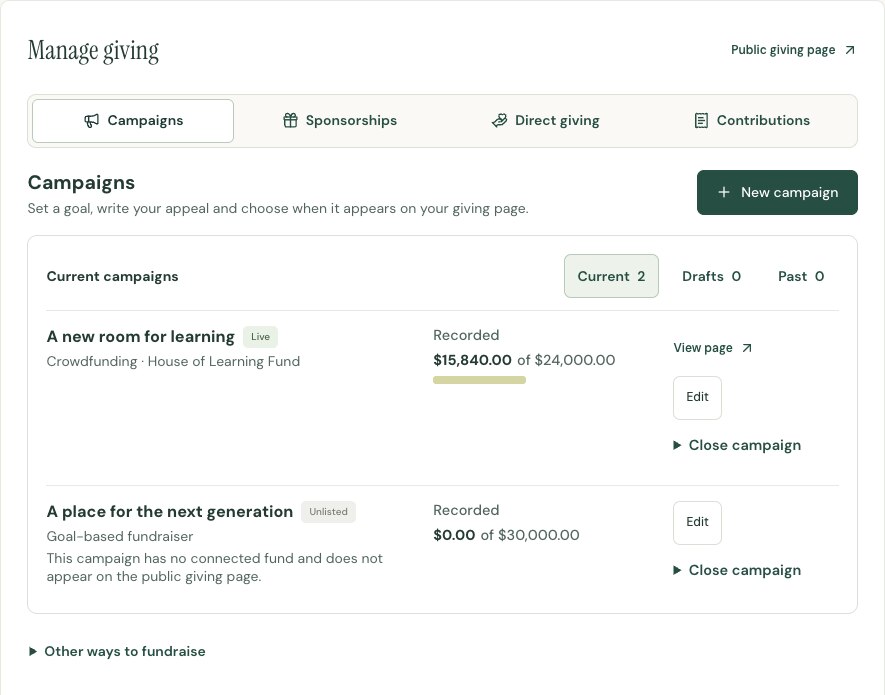
A clear view for the people keeping it moving.
Find current campaigns, return to a draft, or look back at a closed fundraiser. Your office keeps the fund, dates, and recorded total in one place.
Record verified cash and check donations alongside online donations, so a campaign’s progress reflects what the office has recorded.
Build support for what comes next.
Start with Kehilio Giving for fundraising. Choose Home to add a website, or Complete to bring member accounts and your office work together.
Use your Kehilio invitation to create your account. Registering does not start a paid subscription. Once your payment setup is confirmed, publish the campaign and share it with your kehilla.